

Loading...
Loading...
Version 2.0.0
Maintained by Marckenson John (MJS)
This module lets you control DJ Soft Radio BOSS software from a Bitfocus Companion button panel.
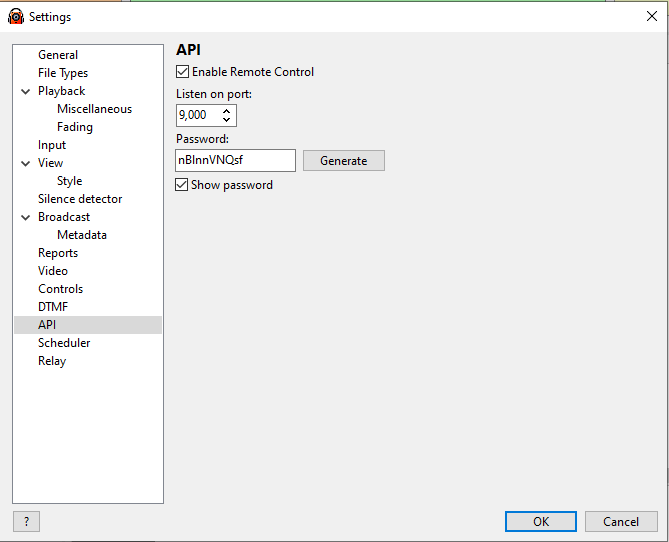
In RadioBOSS go to Settings → Remote Control and enable the HTTP API.
Note the port number (default: 9000) and set a password if desired.
| Field | Description |
|---|---|
| Target IP | IP address of the computer running RadioBOSS |
| Target Port | Port from the RadioBOSS settings (default 9000) |
| API Path | Leave as /api/ for RadioBOSS 6.x. Use / for very old versions. |
| Password | Optional; match the password set in RadioBOSS |
| Enable Polling | Must be ON for feedbacks, variables, and toggle animations to work |
| Polling Rate | How often (ms) to request state from RadioBOSS. 500–1000 ms recommended. |
| Enable Verbose Logging | Turns on detailed error messages in the Companion log |
Each option has On, Off, and Auto Toggle actions:
These feedbacks give you the full Change style properties panel in Companion's feedback editor (PNG icon · Colour · Background · Text). The button style changes when the selected condition is met. All styles are fully customisable.
| Feedback | Default active style | Options |
|---|---|---|
| Mic — Is ON / OFF | Red background | Dropdown: On or Off |
| Scheduler — Is ON / OFF | Green background | Dropdown: On or Off |
| Shuffle — Is ON / OFF | Green background | Dropdown: On or Off |
| Repeat Track — Is ON / OFF | Blue background | Dropdown: On or Off |
| Repeat List — Is ON / OFF | Blue background | Dropdown: On or Off |
| Break — Is ON / OFF | Orange background | Dropdown: On or Off |
| Encoder — Is Active / Offline | Orange background | Dropdown: encoder + Active or Offline |
| Record — Is ON / OFF | Red background | Dropdown: On or Off |
Note on Record state: Recording state is polled from RadioBOSS via
action=streamarchivestatus. The feedback reflects live state regardless of whether recording was started through Companion or RadioBOSS directly.
These drive single toggle buttons — one button handles both ON and OFF, and the button face animates with different colours for each state. All 10 options are customisable per feedback:
| Option | What it controls |
|---|---|
| Active — Label | Text shown when feature is ON / live |
| Active — Text Color | Foreground colour in active state |
| Active — Blink ON Color | Colour shown during the bright phase of the active blink |
| Active — Blink OFF Color | Colour during the dim phase of the active blink |
| Active — Flash Speed | No Flash (solid) / Very Fast / Fast / Medium / Slow / Slow Pulse / Very Slow |
| Inactive — Label | Text shown when feature is OFF |
| Inactive — Text Color | Foreground colour in inactive state |
| Inactive — Blink ON Color | Colour during the bright phase of the inactive blink |
| Inactive — Blink OFF Color | Colour during the dim phase of the inactive blink |
| Inactive — Flash Speed | No Flash (solid) / Very Fast / Fast / Medium / Slow / Slow Pulse / Very Slow |
Set Flash Speed → No Flash on either state to show a solid colour with no animation.
Available toggle flash feedbacks:
| Feedback | Active defaults | Inactive defaults |
|---|---|---|
| Mic Toggle Flash | Fast (500 ms) red flash · MIC LIVE | Slow (1.5 s) dark-red pulse · MIC OFF |
| Scheduler Toggle Flash | Fast green flash · SCHED ON | Slow dark-green pulse · SCHED OFF |
| Shuffle Toggle Flash | Fast green flash · SHUFFLE ON | Slow dark-green pulse · SHUFFLE OFF |
| Repeat Track Toggle Flash | Fast blue flash · RPT TRK ON | Slow dark-blue pulse · RPT TRK OFF |
| Repeat List Toggle Flash | Fast blue flash · RPT LST ON | Slow dark-blue pulse · RPT LST OFF |
| Break Toggle Flash | Fast orange flash · BREAK ON | Slow dark-orange pulse · BREAK OFF |
| Encoder Toggle Flash | Fast orange flash · ENC LIVE | Slow dark-orange pulse · ENC OFF |
Applied to the Encoder 1–4 Conn/Disc presets.
All text, colours, and flash speed are configurable in the feedback options.
| Variable | Description |
|---|---|
$(djsoft-radioboss:module_state) | OK / Error / Not Configured |
$(djsoft-radioboss:version) | RadioBOSS version string |
$(djsoft-radioboss:uptime) | RadioBOSS uptime |
$(djsoft-radioboss:mic_status) | On / Off |
$(djsoft-radioboss:playback_state) | Current playback state |
$(djsoft-radioboss:current_track_title) | Current track title |
$(djsoft-radioboss:current_track_artist) | Current track artist |
$(djsoft-radioboss:current_track_*) | All other current track fields |
$(djsoft-radioboss:previous_track_*) | Previous track fields |
$(djsoft-radioboss:next_track_*) | Next track fields |
$(djsoft-radioboss:scheduler) | On / Off |
$(djsoft-radioboss:shuffle) | On / Off |
$(djsoft-radioboss:repeat_track) | On / Off |
$(djsoft-radioboss:repeat_list) | On / Off |
$(djsoft-radioboss:break) | On / Off |
$(djsoft-radioboss:streamarchive_status) | On / Off |
$(djsoft-radioboss:streaming_listeners) | Total streaming listeners |
$(djsoft-radioboss:encoder_N_name) | Name of encoder N |
$(djsoft-radioboss:encoder_N_status) | Status of encoder N |
$(djsoft-radioboss:encoder_N_listeners) | Listener count for encoder N |
Drag presets from the Presets panel onto your buttons.
Play Track 1, Stop, Pause, Next, Fade to Next, Volume 50%
Each option (Scheduler, Shuffle, Repeat Track, Repeat List, Break) has three presets:
Toggle presets require polling to be enabled.