

Loading...
Loading...
Controls Cisco CBS350 switches via SNMP: read the VLAN of each port, change the access VLAN of a port, switch ports between access and trunk mode, control PoE, and recall complete port layouts (profiles).
Tested on a CBS350-8P-2G with firmware 3.5.3.2.
SNMP is disabled by factory default. The module needs SNMP enabled and an SNMP v2c community with Read-Write access. Choose one of the two methods below.
Web interface
Log in to the switch web interface.
In the page header, switch the Display Mode from Basic to Advanced. In Basic mode, the SNMP menu is hidden.
Security > TCP/UDP Services: check SNMP Service, then click Apply.
SNMP > Communities: click Add, then set:
companionClick Apply.
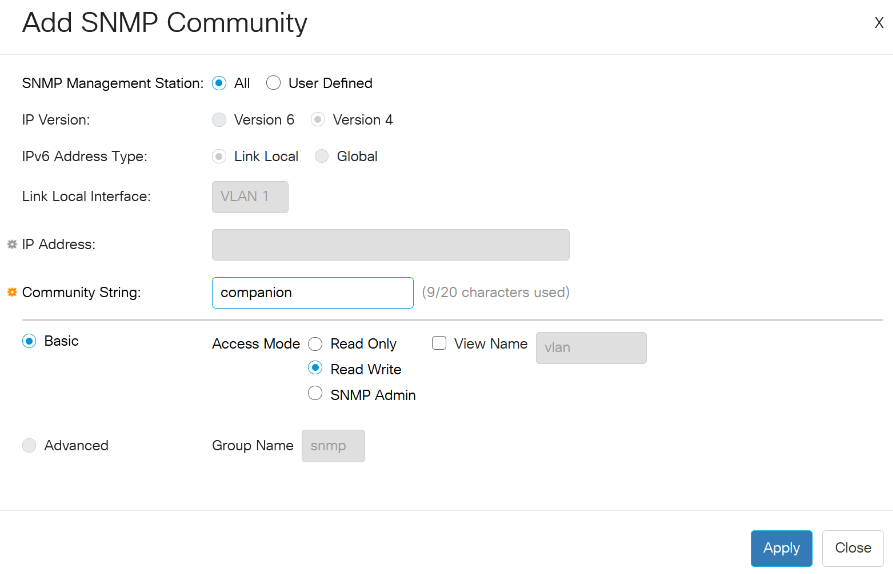
Click the Save icon at the top of the page so the settings survive a reboot.
CLI (SSH or console)
configure terminal
snmp-server server
snmp-server community companion rw 192.168.1.10
end
write memory
Replace companion with your community name and 192.168.1.10 with the IP address of the Companion computer.
Without the IP address, any device can use the community.
SNMP v2c sends the community in clear text, and a Read-Write community allows changing the switch configuration. Restrict it to the Companion IP address and keep the switch management on a trusted network.
9,10.
Protect at least the port that connects the switch to Companion.The presets work with a selected port: press a port button first, then the buttons of the VLANs and Selected port sections act on that port. The Ports and VLANs presets are generated from the switch, so they appear once the module has read it.
Quick start
Ports: one button per port, showing the port name and its VLAN (1013 for an access port, T 1 for a trunk with
native VLAN 1). Pressing it selects the port.
| Color | Meaning |
|---|---|
| Red | Link down |
| Green | Link up |
| Yellow text | Link up below 1 Gb/s (100 Mb/s device, bad cable...) |
| Grey | Port disabled (shutdown) |
| Orange | Selected port (takes priority over the other colors) |
VLANs: one button per VLAN of the switch, showing its id and name. Pressing it puts the selected port in access mode on that VLAN (also from trunk mode). The button is light blue when the selected port is on that VLAN.
Selected port
| Preset | Shows | On press | Colors |
|---|---|---|---|
| Selected port info | Port name and speed, VLAN name, LLDP neighbor | - | Red = link down, green = up, yellow text = below 1 Gb/s |
| Description | Port name and description | - | - |
| LLDP neighbor | Name of the connected device and its port | - | - |
| TRUNK | - | Trunk mode, all VLANs tagged, native VLAN 1 | White when the port is a trunk |
| ACCESS | - | Back to access mode on the previous access VLAN | White when the port is in access mode |
| Reset Link | - | Shut / no shut, the device renews its DHCP lease | - |
| Reset PoE | - | Cuts the PoE power for 5 s to restart the device | - |
| PoE on/off | PoE state and power | Toggles PoE (off is power inline never) | Dark green = PoE on, green = delivering power, grey = off or no PoE |
| Port enable/disable | Whether the port is enabled | Toggles the port (disabled is shutdown) | Green = enabled, grey = disabled |
To use another native VLAN for TRUNK, or another power off duration for Reset PoE, edit the action options of the button.
Profiles: one select button per profile slot, showing the profile name, plus STORE and RECALL buttons acting on the selected slot (see Profiles below).
| Preset | On press | Colors |
|---|---|---|
| Profile 1 to 8 | Selects the profile slot | Orange = selected, blue = the switch matches the profile |
| STORE | Stores the current layout of all non-protected ports in the selected slot | - |
| RECALL | Applies the selected profile | Blue when the switch already matches the profile |
Switch: Save config saves the running-config to the startup-config (write memory). It is orange when the
module made changes that are not saved yet.
Most port actions exist for a given port and for the selected port.
power inline never.shutdown.The VLAN changing actions also have a Reset link after change option.
A profile describes the VLAN of several ports, one entry per line or comma separated:
Port 5=1013, Port 6=1013, Port 7=1012, Port 3=T1
<port>=<vlan> puts the port in access mode on that VLAN, <port>=T<vlan> in trunk mode with that native VLAN. The
port can also be written 5 or gi5.
A profile is validated entirely before being applied: if an entry refers to an unknown port, a protected port or a VLAN that does not exist, nothing is changed and the reason is logged. Ports already in the right state are skipped.
model_name, system_name, port_count, unsaved_changes (Yes/No), last_savecurrent_profile: current port layout in profile syntaxselected_port_id, selected_profile, selected_profile_name, profile_N_name, profile_Nport_N_..., N = port number) and for the selected port (selected_port_...):
name, alias (description), status (Up/Down), enabled (Yes/No), speed (1G/100M/10M)mode (access/trunk), vlan (native VLAN for trunks), vlan_name, summary (1013 for access, T 1 for a
trunk with native VLAN 1)poe (delivering/searching/fault/off), poe_power (e.g. 3.1 W)neighbor, neighbor_port: device connected to the port, from LLDPfault is also reported for devices that are not PoE powered.Cisco
CommunityCisco
Community