Bitfocus AS
logo
logo
Bitfocus AS
logo
logo
Sign upSign in

Loading...

Bitfocus

Subscribe to our newsletter

The latest news, articles, and resources, sent to your inbox.

FacebookInstagramGitHubYouTubeLinkedIn

Products

  • Buttons
  • Companion

Integrations

  • Supported Devices
  • Developer Community
  • Connection Development

Support

  • Support Overview
  • Documentation
  • Video Tutorials
  • Community Forum

Sales

  • Resellers & Integrators
  • Buttons Pricing

Updates

  • Case Studies
  • Events & Trade Shows
  • Press Releases
  • Product Updates
  • Webinars

Legal

  • Legal Overview
  • Privacy Policy
  • Buttons EULA
  • Terms & Cookie Policy

Company

  • About us
  • Press kit
  • Careers

© 2026 Bitfocus AS. All rights reserved.

  1. Connections
  2. adlerluiz - YouTube Music Desktop

adlerluiz

YouTube Music Desktop

Community1.1.0Updated last year
DocumentationReport an issueView on GitHub

Documentation

Youtube Music Desktop

Interact with YTM Desktop (https://github.com/ytmdesktop/ytmdesktop)

Configuration

  • Open the settings menu by clicking the cog icon in the top right corner

Settings cog

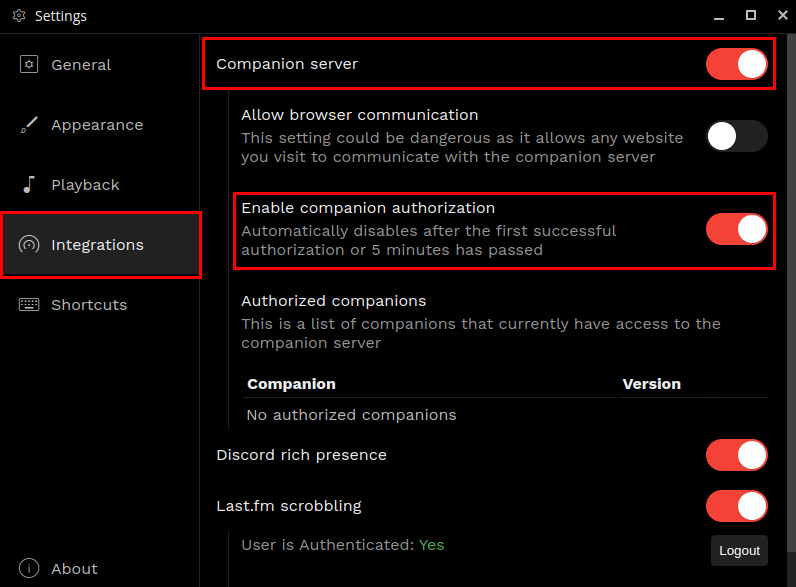
  • Open the "integrations" tab and ensure "Companion server" and "Enable companion authorization" are both checked

Proper settings

  • Go back to Companion and click "Save" or re-enable the connection.
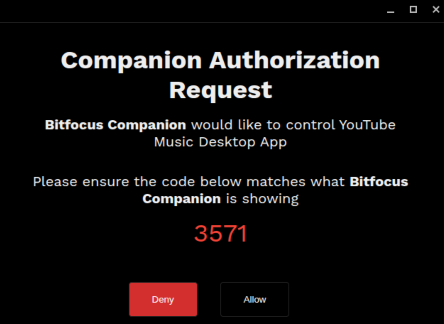
  • A popup will appear asking you to authorize the connection.

Authorization popup

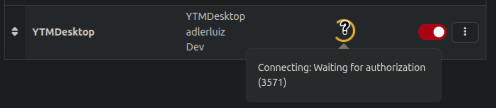
  • You can check the code by hovering over the loading icon in Companion.

Code in companion

  • Click "Allow". The popup will close and you should see a green check in Companion.

Available actions

  • playPause (Toggle play/pause state of the player)
  • play (Play)
  • pause (Pause)
  • volumeUp (Increase the volume of the player by 10%)
  • volumeDown (Decrease the volume of the player by 10%)
  • setVolume (Set the volume of the player)
  • mute (Mute the player)
  • unmute (Unmute the player)
  • seekTo (Seek to a specific position in the currently playing track)
  • next (Skip to the next track)
  • previous (Go back to the previous track)
  • repeatMode (Set the repeat mode of the player)
  • shuffle (Enable/disable shuffle mode)
  • playQueueIndex (Play a specific track from the queue)
  • toggleLike (Toggle the like state of the currently playing track (note: this does not toggle like/dislike, it just toggles like/unlike))
  • toggleDislike (Toggle the dislike state of the currently playing track (note: this does not toggle like/dislike, it just toggles dislike/undislike))
  • changeVideo (Change the currently playing track to a specific video or playlist)

Available feedbacks

  • AlbumCover (Sets the PNG to the album cover of the currently playing track)

Available variables

  • title (Title of the currently playing track)
  • artist (Artist of the currently playing track)
  • volume (Volume of the player (1-100))
  • duration (Duration of the currently playing track)
  • trackProgress (Video progress of the player (seconds with 2 decimals))
  • trackState (State of the player (unknown, paused, playing, buffering))
  • videoId (Video ID of the currently playing track)

Details

Manufacturer
adlerluiz
Product
YouTube Music Desktop
Latest Version
1.1.0
Author
dandandev
Contributor
dandanthedev(23)

Open Issues and Requests

To file a new issue, you need to sign up for a user on GitHub.

Go to GitHub issues →

In other news

Buttons v1.8 Main with text

Buttons v1.8

October 2, 2026

Buttons v1.8 IBC award win

Bitfocus wins IBC2026 Best of Show Award for latest Buttons enhancements

September 21, 2026

Buttons v1.8 grey background

Biggest functionality boost yet makes Buttons the perfect platform for broadcast and media management

September 10, 2026

Vivid Buttons on screen

Bitfocus Buttons makes complex OB production feel simple

August 10, 2026

View all news →