

Bitfocus AS
logo
logo
Bitfocus AS
logo
logo
Sign upSign in

Loading...

Bitfocus

Subscribe to our newsletter

The latest news, articles, and resources, sent to your inbox.

FacebookInstagramGitHubYouTubeLinkedIn

Products

  • Buttons
  • Companion

Integrations

  • Supported Devices
  • Developer Community
  • Connection Development

Support

  • Support Overview
  • Documentation
  • Video Tutorials
  • Community Forum

Sales

  • Resellers & Integrators
  • Buttons Pricing

Updates

  • Case Studies
  • Events & Trade Shows
  • Press Releases
  • Product Updates
  • Webinars

Legal

  • Legal Overview
  • Privacy Policy
  • Buttons EULA
  • Terms & Cookie Policy

Company

  • About us
  • Press kit
  • Careers

© 2026 Bitfocus AS. All rights reserved.

  1. Connections
  2. Toggl - Track

Toggl

Track

Communityv2.2.1Updated 2 months ago
DocumentationReport an issueView on GitHub

Documentation

Companion Module Toggl Track

This module allows you to start and stop Toggl Track timers.

Configuration

Before using this module you must create a Toggl Track account. Then go to your Toggl profile settings page and copy the API token. Look for this section on your toggl profile.
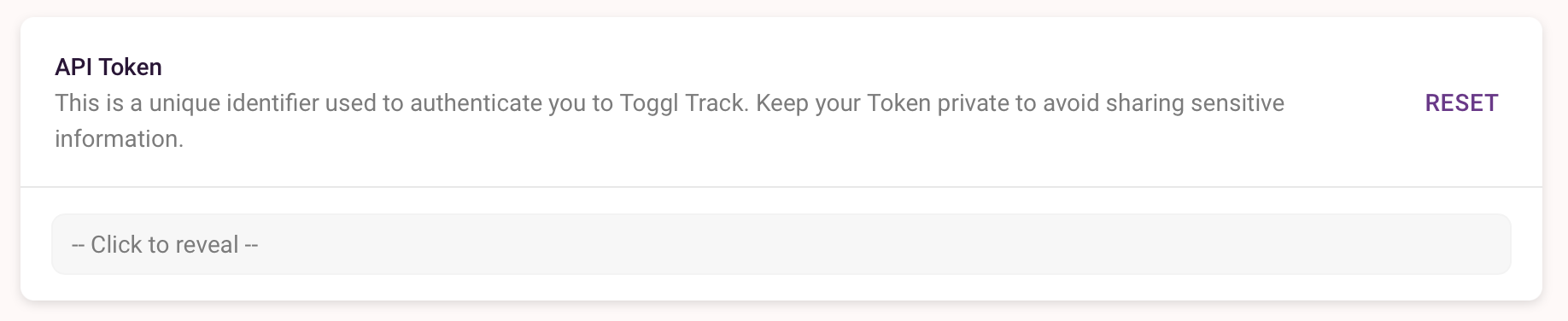
api token

Paste this token into the config page of this module and click save. If all is well the module status will turn green.

Actions

Start New Timer

Start a new timer running with the description set in the action and store the ID. If a list of projects has been retrieved on startup you can choose a project. By default a new timer can't be started if one is already running. This behaviour can be changed by ticking the 'Always Start' option in the module configuration.

Get Current Timer

Companion only knows the ID of timers it has started. If you did not enable time entry poller you can use this action to poll the current time entry, if a timer is started from another application or the toggle website so Companion knows about it.

Stop Current Timer

Attempt to stop the current timer. This will fail if Companion doesn't know the ID of the currently running timer.

Refresh Project List

Retrieves the current list of projects from the toggl server. This action runs automatically when Companion starts and when the module is enabled.

Presets

Presets are available for Start Timer and Stop Timer.

History

Version 1.0.0

  • First release

Version 1.0.1

  • Fix broken link

Version 1.0.2

  • Allow a project to be specified when starting a new timer button
  • Add an action to refresh the project list
  • Add 'Always start' configuration option

Version 1.0.3

  • Add variables for timerId and timerDescription

Version 2.0.0

  • Updated for Companion version 3
  • Updated for toggl API version 9

Version 2.0.1

  • Make the API token config field required
  • Fix manifest file

Version 2.1.0

  • Rewrite module in typescript
  • Use module toggl-track instead of implementing api on our own
  • Add status reports for some failure cases in connections dashboard
  • Add configurable time entry poller
  • Add feedback for currently running project and client
  • Update timerDuration to contain the correct duration formatted as time string

Version 2.1.1

  • Prevent module crash if user has no Clients

Version 2.1.2

  • Update node runtime to node22
  • make polling interval configurable as toggl is updating their API usage limits

Version 2.1.3

  • update dependencies (fix CVE-2025-58754)
  • handle rate limiting of toggl

Version 2.2.0

  • update to companion api 2.0

Details

Manufacturer
Toggl
Product
Track
Latest Version
v2.2.1
Authors
Peter Daniel
Matthias Kesler
Contributors
daniep01(30)
krombel(23)
josephdadams(1)
bryce-seifert(1)

Open Issues and Requests

To file a new issue, you need to sign up for a user on GitHub.

Go to GitHub issues →

In other news

Buttons v1.8 Main with text

Buttons v1.8

October 2, 2026

Buttons v1.8 IBC award win

Bitfocus wins IBC2026 Best of Show Award for latest Buttons enhancements

September 21, 2026

Buttons v1.8 grey background

Biggest functionality boost yet makes Buttons the perfect platform for broadcast and media management

September 10, 2026

Vivid Buttons on screen

Bitfocus Buttons makes complex OB production feel simple

August 10, 2026

View all news →