

Bitfocus AS
logo
logo
Bitfocus AS
logo
logo

Loading...

Bitfocus

Subscribe to our newsletter

The latest news, articles, and resources, sent to your inbox.

FacebookInstagramGitHubYouTubeLinkedIn

Products

  • Buttons
  • Companion

Integrations

  • Supported Devices
  • Developer Community
  • Connection Development

Support

  • Support Overview
  • Documentation
  • Video Tutorials
  • Community Forum

Sales

  • Resellers & Integrators
  • Buttons Pricing

Updates

  • Case Studies
  • Events & Trade Shows
  • Press Releases
  • Product Updates
  • Webinars

Legal

  • Legal Overview
  • Privacy Policy
  • Buttons EULA
  • Terms & Cookie Policy

Company

  • About us
  • Press kit
  • Careers
Co-funded by the European Union

Our Bitfocus Workflow 2.0 project is co-funded by the European Union’s Creative Europe programme. About the project

© 2026 Bitfocus AS. All rights reserved.

  1. Connections
  2. Global Cache - iTach IP2SL, GC-100

Global Cache

iTach IP2SL · GC-100

Communityv3.0.0Updated 2 days ago
DocumentationReport an issueView on GitHub

Documentation

GlobalCache iTach IP2SL / GC-100

This module sends serial (RS-232) data through a GlobalCache iTach IP2SL, a serial port of a GC-100, or a computer running ser2net.

Configuration

  • Type in the IP address of the device.
  • Set the port. The iTach IP2SL uses port 4999. On a GC-100, the first serial port is 4999, the second 5000.

Serial communication is 8 data bits and one stop bit. Parity, hardware flow control and baud rate (up to 115.2 Kbaud) are set on the device's own web page, as are Serial Multiconnection Mode, 7 data bit mode and 2 stop bit mode. If the serial settings don't match the connected device, buffer overflows (data loss) or parity errors will occur; these are shown on the device's Serial web page.

Make sure the baud rate, options and serial cable match your serial device.
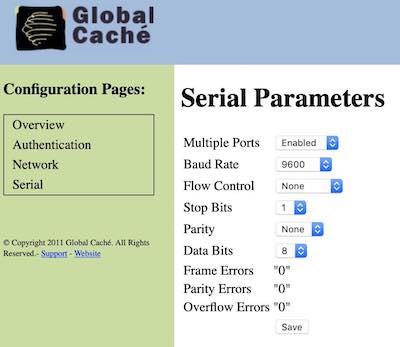
Serial Parameters

Available Actions

  • Command: sends the text as it is, without interpretation or conversion, followed by the selected line termination:
    • No termination
    • \r Carriage Return (default)
    • \n Line Feed
    • \r\n Carriage Return and Line Feed
  • HEX Command: sends the hex values entered as bytes, e.g. 81 01 04 00 02 FF. Characters other than 0-9 and A-F are ignored.

Both accept variables.

Available Feedbacks

  • Response Matches: the last response from the device matches the value. Choose whether to compare it as Text or Hex, and whether it must equal the value, contain it, or match a regular expression.
    • In Hex, separators are ignored, so 1C 01 20 matches 1c0120, and the comparison ignores case.
    • Many devices end their replies with a carriage return or line feed, which an Equals match must include; Contains, or a regular expression, avoids that.
    • The value accepts variables.

Available Variables

  • response: the last data received from the device, as text
  • response_hex: the same data, as hex
  • response_time: when it was received, as Unix time in milliseconds. This changes on every response, even when the device sends the same reply again, so a trigger watching it runs for each response.

Serial data has no message boundaries, so a long reply may arrive in more than one part, and the variables and feedback use the last part received. The variables are empty until data has been received.

ser2net

The module also works with a computer running ser2net, for example a Raspberry Pi with a USB to RS-232 adapter (this has been used to control a camera with only an RS-232 VISCA port).

Configure the serial connection in ser2net, and set the module's port to the one ser2net listens on. An example ser2net line to forward raw VISCA hex commands to a camera with a 9600 baud serial port on port 4999:

4999:raw:5:/dev/ttyUSB0:9600 8DATABITS NONE 1STOPBIT

Details

Manufacturer
Global Cache
Products
iTach IP2SL, GC-100
Latest Version
v3.0.0
Authors
BitfocusBitfocus AS
Casey Selph
Joseph Adams
Contributors
josephdadams(8)
cxselph(5)
Julusian(4)
haakonnessjoen(3)
krocheck(3)

Open Issue and Request

dvia022#6 Disconnecting

To file a new issue, you need to sign up for a user on GitHub.

Go to GitHub issues →

In other news

Buttons v1.10 Release

Even more boosts for efficiency, reliability and security in latest Buttons release

November 23, 2026

Buttons v1.10 MCP webinar

Webinar Buttons v1.10 - MCP

November 17, 2026

Security Advisory

Buttons Security Advisory - CVE-2026-111497

October 26, 2026

Webinar Buttons v1.8

Webinar Buttons v1.8 Release

October 13, 2026

View all news →

More from Global Cache

iTach IP2CC · GC-100

Global Cache

Community
GPIO
View Connection

iTach IP2IR · iTach WF2IR

Global Cache

Community
ProtocolsSmart Home
View Connection